


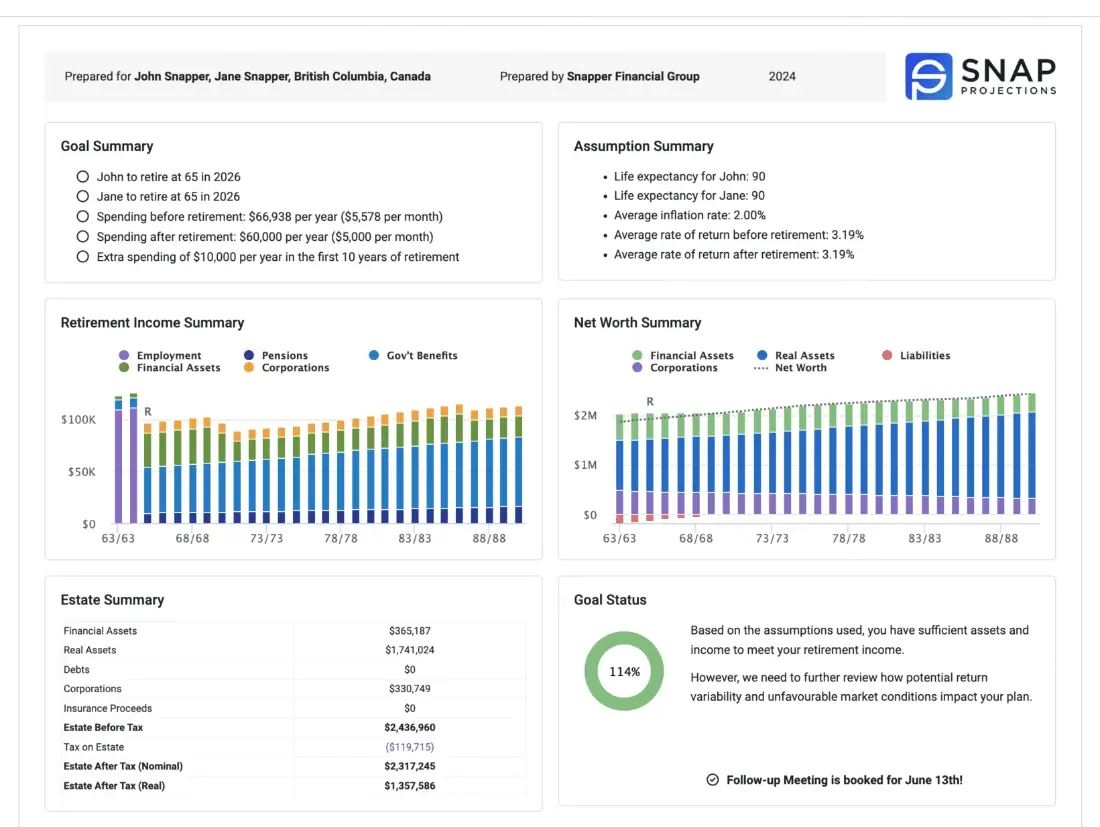
Today’s clients expect financial advice that’s clear, visual, and actionable. Long reports can overwhelm—what they value most is a simple snapshot that connects their goals to a concrete plan.
A one-page financial plan does exactly that. It condenses a client’s financial picture into a focused summary that supports confident decisions and more productive conversations.
This article outlines the essential elements of an effective one-page plan, provides a free downloadable template, and shares best practices for creating client-ready summaries. It also highlights how Snap Projections’ SnapShot Report takes this approach further with interactive visuals, automated updates, and customizable layouts for professional client presentations.
Main takeaways from this article
- A one-page financial plan gives clients a clear snapshot of their goals, assumptions, and progress—making financial conversations simpler and more focused
- Condensing complex data into a visual, easy-to-read format helps clients stay engaged and confident in their financial plan
- The article includes a free one-page template that Advisors can customize to create concise, professional planning summaries
- Regularly updating the one-page plan keeps it relevant, actionable, and aligned with each client’s evolving goals
- Tools like Snap Projections’ SnapShot Report expand on this format with interactive charts, automated data updates, and tailored client presentations
What is a one-page financial plan?
A one-page financial plan is a concise summary that captures a client’s financial situation, goals, and action steps on a single page. It distills financial strategies into an easy-to-understand format that clients can quickly grasp and refer to regularly.
The concept was popularized by Carl Richards in his book “The One-Page Financial Plan,” where he advocates for simplicity in financial planning. Behind this streamlined document lies sophisticated financial modelling that ensures recommendations are sound and comprehensive.
While the summary fits on one page, it’s supported by detailed analysis, projections, and assumptions; an extensive “appendix behind the scenes” that informs every recommendation.
You can create a one-page financial plan template that includes key sections like goals, net worth, retirement income, expenses, and recommendations. This approach works for both simple and complex client situations.
| Simplify planning with our free toolkit |
| Access templates, worksheets, and planning resources designed to help Advisors create clear, client-ready one-page financial plans. |
| Download the Financial Planner Toolkit |
Why Advisors value a single-page summary
A traditional financial plan can be overwhelming, making it difficult for clients to stay engaged and focused. One-page financial plans offer several advantages for Financial Advisors:
- Improves client understanding: Simplifies financial strategies into a clear, digestible format that keeps clients focused.
- Strengthens engagement and buy-in: Helps clients feel ownership and confidence in their financial roadmap.
- Saves time and boosts efficiency: Advisors save time by streamlining meetings, explanations, and faster plan updates, so Advisors can focus on strategy.
- Supports long-term relationships: Regular updates keep clients informed and connected as goals evolve.
- Drives practice growth: A scalable, streamlined approach allows Advisors to serve more clients effectively and supports practice growth.
In an environment where some providers offer financial advice for just $100, Advisors can stand out by prioritizing clarity and focused guidance.
Additionally, research from 2023 revealed that only 25 percent of Canadians work with a Financial Advisor, and nearly 30 percent have no formal financial plan at all. This gap highlights the ongoing challenge of accessibility and engagement in financial planning; many Canadians either feel overwhelmed by complexity or unsure where to begin.
A one-page financial plan can help bridge this divide by turning sophisticated financial strategies into clear, actionable insights that clients can easily understand and revisit over time.
Download samples of a one page report
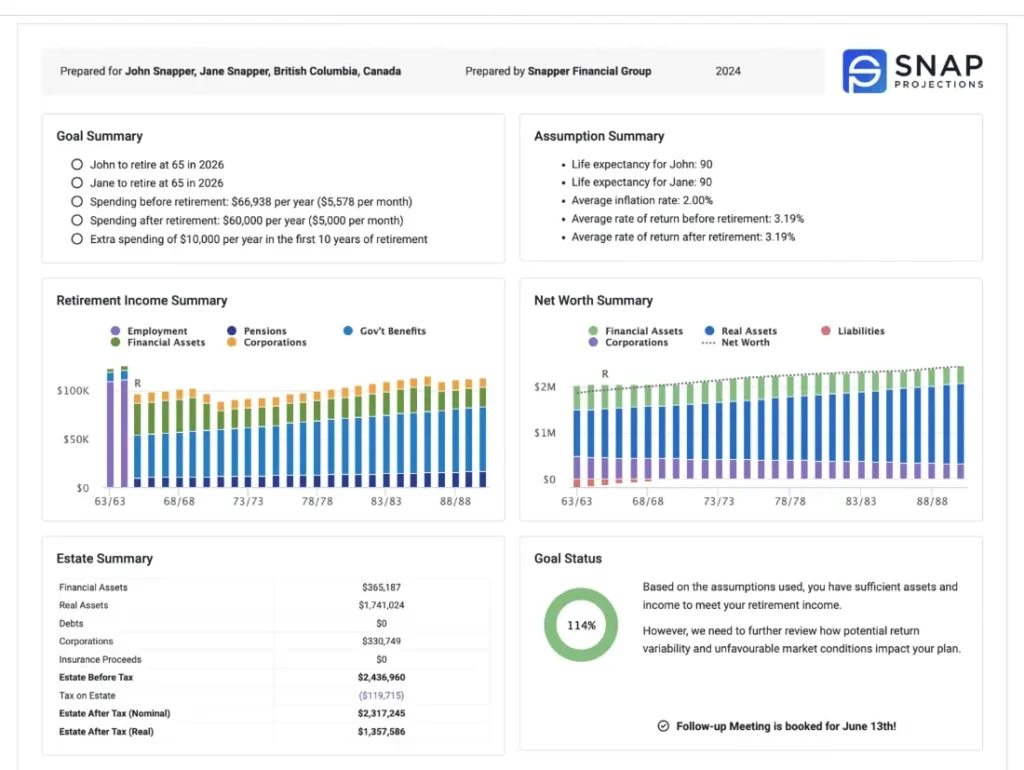
This is a sample of the one page financial plan report summary. Click here to download sample reports.
Key elements of a one-page financial plan template
A one-page financial plan provides a clear, high-level view of a client’s goals, assumptions, and financial position—distilling complex data into an actionable summary. Each element serves a specific purpose, helping clients understand their situation at a glance while giving Advisors a structured framework for discussion.
Financial planning software like Snap Projections supports this process by allowing Advisors to model data, generate visuals, and update key metrics automatically as client circumstances evolve.
1. Goal summary
The foundation of every financial plan is a clear set of goals. This section defines what clients want to achieve, aligning both Advisor and client on priorities and outcomes. Goals should be realistic, measurable, and tied to meaningful life events.
When outlining this section, consider including:
- SMART goals: Specific, Measurable, Achievable, Relevant, and Time-bound objectives (e.g., retirement, education, or home ownership).
- Goal categories: Short, medium, and long-term milestones to help structure the plan.
- Purpose and alignment: A clear link between goals and recommended strategies or actions.
In Snap, Advisors can enter these goals directly into the plan and link them to projections and recommendation modules for clarity and consistency.
2. Assumption summary
Assumptions are the variables that shape every projection in the financial plan. Documenting them creates transparency and helps clients understand how economic and personal factors influence their outcomes.
Key assumptions typically include:
- Client details: Names, ages, and life expectancies for the client and spouse (if applicable).
- Economic factors: Expected inflation rate and projected investment returns before and after retirement.
- Custom inputs: Adjustments to reflect unique financial conditions, tax rates, or contribution patterns.
Snap allows Advisors to customize these assumptions easily, ensuring projections stay relevant as markets and client goals change.
3. Net worth summary
A client’s net worth offers an at-a-glance measure of their financial position. This section summarizes total assets, liabilities, and the resulting net worth, often visualized over time to show progress toward long-term goals.
Include:
- Assets: Registered and non-registered investments, real estate, and other holdings.
- Liabilities: Mortgages, loans, credit lines, and other debts.
- Trend visualization: A chart showing how net worth changes over the projection period, with the first year of retirement marked “R.”
Within Snap, Advisors can generate a net worth chart automatically, helping illustrate progress and highlight opportunities for debt reduction or investment growth.
4. Retirement income summary
This section outlines how clients will generate income throughout retirement. By illustrating the timing and proportion of different income streams, Advisors can show clients how their financial picture will evolve after leaving the workforce.
Key details may include:
- Income sources: Government benefits, employer pensions, personal savings, and investment withdrawals.
- Timing: When each source begins and how long it lasts.
- Visuals: A simple chart showing total income over time, with the first year of retirement clearly identified.
Snap supports this by creating dynamic retirement income charts that integrate with assumptions and withdrawal strategies to present a complete income picture.
5. Expense summary
Expenses show how much a client spends and how their spending patterns shift over time. Visualizing expenses helps identify surpluses, shortfalls, or lifestyle adjustments that may be required.
Include:
- Base expenses: Ongoing essentials such as housing, food, and insurance.
- Additional or discretionary expenses: Items like travel, hobbies, or charitable giving.
- Shortfalls: Periods where spending exceeds available income.
In Snap, Advisors can generate an Expense Summary chart that displays base, additional, and shortfall categories over time, helping guide conversations about lifestyle sustainability.
6. Financial asset flows
This section summarizes contributions and withdrawals across key accounts to show how savings and investment balances change year over year. It connects directly to the client’s cash-flow strategy.
Include:
- Account types: Registered (RRSP, RRIF, LIRA, TFSA, FHSA), and non-registered.
- Contribution and withdrawal patterns: Planned savings before retirement and drawdowns after retirement.
- Projection period: The first five years for focused visibility.
Snap automatically generates Financial Asset Flows tables, giving Advisors and clients a clear view of near-term savings and withdrawal activity.
7. Goal status
The goal status section summarizes how clients are tracking toward their key objectives. It highlights progress, identifies shortfalls, and provides a basis for adjusting strategies or expectations.
Consider including:
- Progress indicators: Whether goals are on track, ahead, or require attention.
- Scenario results: How different assumptions or decisions affect goal outcomes.
- Personalized notes: Context around changes or updates since the last review.
In Snap, the goal status card pulls directly from the automated recommendation module, giving Advisors data-driven insights in real time.
8. Recommendation summary
The recommendation summary translates analysis into action. This section focuses on the next steps clients can take to move closer to their financial goals, grounded in the projections and results of the plan.
Recommendations often include:
- Action items: Specific steps such as adjusting contributions, updating insurance, or reviewing investment allocations.
- Key insights: Highlights of what’s working well and what needs refinement.
- Future reviews: Suggested timing for the next plan update or review.
Advisors can enter and format static text or template variables, offering flexibility to tailor recommendations and guide clients through their financial plans. Using templated variables ensures that when plans are updated, the data within the SnapShot refreshes automatically. This helps keep recommendations current while reducing manual updates over time, allowing Advisors to focus more on delivering meaningful conversations and personalized insights.
| Turn insights into client-ready visuals |
| Use Snap Projections to model assumptions, test scenarios, and automatically generate one-page summaries backed by real financial data. |
| Explore financial planning software for Advisors |
Download Snap’s Financial Planner Toolkit
Building a one-page financial plan starts with asking the right questions.
Snap’s Financial Planning Questionnaire, included in the free Financial Planner Toolkit, helps Advisors gather the essential client information needed to create comprehensive and personalized plans.
The questionnaire walks Advisors through every key area of financial planning; from cash flow and investments to retirement goals, tax strategies, and insurance coverage, making it easy to organize data and uncover opportunities for deeper advice. It also includes sections on corporate assets, government benefits, and estate planning, ensuring no details are overlooked.
Advisors can use this workbook as part of their onboarding process to streamline data collection, enhance client conversations, and build more accurate projections in Snap Projections.
Download the Financial Planner Toolkit to access the full questionnaire and start improving your client planning process today.
| Bring clarity to every client meeting |
| Present plans that combine simplicity with precision. Book a live demo to see how Snap Projections can help you create engaging, data-driven one-page plans. |
| Book a demo |
Expanding the one-page plan for annual reviews or summaries
For annual or quarterly reviews—or as an executive summary to a full financial plan—the one-page summary can be expanded into a concise two-page report. Using Snap Projections’ SnapShot Report, Advisors can add up to ten optional sections for deeper insights while keeping the format clear and client-friendly.
In addition to the eight sections referenced earlier, Advisors can also include:
- Net Worth Statement Summary: A detailed table showing assets and liabilities at the start of the plan, providing a clear financial baseline.
- Financial Asset Flows: A five-year view of contributions and withdrawals across key accounts, illustrating how savings and drawdown strategies evolve.
These additions give Advisors flexibility to create a more comprehensive yet still streamlined summary for client reviews and presentations.
Six best practices for creating & presenting a one-page financial plan
Creating and presenting a one-page financial plan effectively requires balancing simplicity with precision—offering clients clarity while grounding every recommendation in solid data.
1. Lead with client values
Start each discussion by connecting the plan to what matters most to the client. Values such as family security, lifestyle goals, philanthropy, or legacy planning provide the foundation for meaningful recommendations. When clients see that their plan aligns with their personal motivations—not just their numbers—they are more engaged and confident.
In Snap, Advisors can use the customizable Recommendation Summary section to highlight client priorities directly within the plan, ensuring recommendations align with both financial goals and personal values.
2. Communicate with simplicity and visuals
A one-page plan should communicate essential information clearly and visually. Use concise language and focus on the most relevant metrics—goals, assumptions, projections, and recommendations. Incorporating charts and visuals helps clients grasp trends quickly and keeps meetings collaborative and engaging.
3. Back simplicity with detailed analysis
While the summary appears straightforward, it should be grounded in detailed projections and cash-flow analysis. This ensures accuracy and reinforces the credibility of the one-page plan. Advisors can use the one-page report as a discussion guide while maintaining full data and modelling behind the scenes. Software like Snap Projections helps connect this detailed modelling to the concise summary automatically, ensuring precision and consistency.
4. Personalize and make it actionable
Tailor each plan to the client’s circumstances, using realistic assumptions and scenario comparisons to make it relevant. Then, translate insights into prioritized recommendations—specific steps clients can take between meetings. A personalized, actionable plan keeps clients engaged and motivated to follow through.
5. Revisit protection and risk management
Each review should include a brief check of the client’s protection strategies to ensure their progress is safeguarded. Reviewing insurance coverage, emergency savings, and estate documents reinforces that the plan supports both financial growth and long-term security.
6. Review and update regularly
Financial planning is an ongoing process. Schedule regular reviews to reassess assumptions, track goal progress, and adjust for life events or market changes. Regular updates keep the plan accurate and demonstrate continued Advisor involvement and support.
Simplify growth with a one-page financial plan template
A one-page financial plan helps Advisors communicate clearly, strengthen client relationships, and enhance their practice.
Snap Projections makes it easy to build these impactful one-page plans with tools like scenario comparisons, quick analysis, and the one-page SnapShot report—an executive summary that keeps clients engaged and informed.
Experience how a one-page financial plan can strengthen client relationships and simplify financial planning. Start a 14-day free trial of Snap Projections today.