

This tax-focused financial planning webinar was filmed on June 24, 2025. Live attendance was required to be eligible for CE Credit.
Comparing Scenarios for increased tax efficiency
As we move into the case study, we’re going to be building out multiple scenarios that we can compare and optimize. When it comes to focusing on tax efficiencies, we’re going to be exploring some key areas for our 55 year-old case study couple who are planning to retire in just 5 years:
- Pension income splitting
- Pension tax credits
- Portfolio turnover
- Charitable donations
- RRIF conversion age
- TFSA contributions
- OAS clawback
They’re wondering if they’re on track for retirement and if there are any changes they can make to improve the tax efficiency of their financial picture.
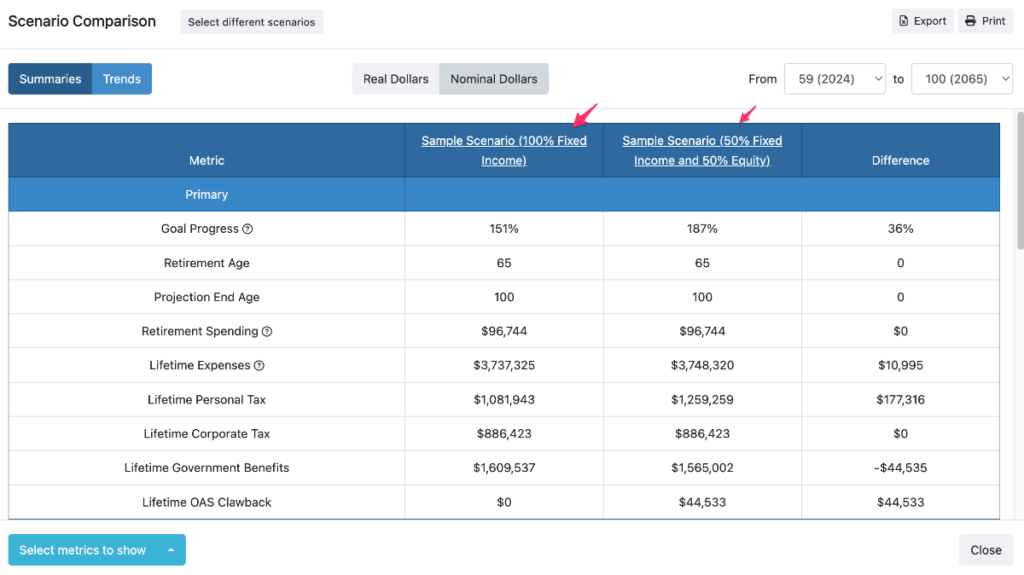
Advisors can compare up to 5 scenarios on a single page. Select just two plans to compare to include the ‘Difference” column which highlights the net value of working together.
This comparison module is highly customizable. Advisors can:
- Compare up to 5 scenarios on one-page or compare just two scenarios to automatically produce the “Difference” column
- Pick from 29 metrics you would like to show and compare for highly personalized planning
- Change the timeline of the comparison plus visually compare metrics with additional charts
Tax Planning Case Study: lesson plan
Scenario 1 – without tax planning strategies
- Inconsistent Marginal Tax Rates
- OAS claw back
Scenario 2 – with default tax planning strategies
- Pension Income Splitting
- Decumulation strategy for tax minimization and deferral
Scenario 3 – with additional tax planning strategies
- Pre-retirement contributions
- Target annual taxable income in retirement
- TFSA top-ups
- Tax-loss harvesting
- In-kind charitable contributions
Watch the financial planning webinar
Want to follow along in the software as you learn? Canadian Financial Advisors, Planners, and Investment Managers are eligible to start a 14-day Free Trial of Snap Projections financial planning software.
Base case data entry details for the case study
Let’s get started by clicking create new client.
- Client
- Hanna Sharp
- Born 1970-01-01
- Ruben Sharp
- Born 1970-01-01
- Living in Ontario
- General
- Retirement Age 60 and 60
- FP Canada Guidelines for Inflation Settings
- Rates of return as 1%, 2%, 5% – We’ve reduced the assumption guidelines by management fees to arrive at a net return assumption
- Expenses
- Base Expenses to $108K
- Starts in retirement (can customize from the Planning page). So much flexibility – can enter target spending as we have here based on the client’s information, but if you don’t know what to enter, keep it $0 and run Sustainable Scenario on the Planning page
- Add Additional Expenses of:
- Additional Travel of $15K joint from age 60 to 74, Indexed to Inflation with Highlighting.
- Renovation of $100K at age 61, not indexed to inflation with Highlighting.
- Base Expenses to $108K
- Incomes
- Hanna
- Employment Income of $130,000 indexed to Inflation until age 59.
- Mention option for Joint incomes (e.g., rental income)
- DBPP (from Previous employer)
- Start Age of 60, $45,000, 60%, 1%, $38,000, 60%, 1%.
- Employment Income of $130,000 indexed to Inflation until age 59.
- Ruben
- Employment Income of $120,000 indexed to Inflation until age 59,
- Hanna
- Assets
- Hanna
- Discuss the Default account and then delete it.
- Joint Non-reg $300K at 100% FI
- Non-reg $230K/$70K at 30%/70%
- TFSA $130K at 30%/70%
- RRSP $380K at 30%/70%
- TFSA Contribution Room of $7K (Tabs for updating default settings if desired)
- RRSP Contribution Room of $35K
- Home worth $1.2MM with $700K cost, Joint Yes
- Ruben
- Delete Default
- TFSA $125K at 40%/60%
- Personal RRSP $520K at 40%/60%
- Group RRSP $280K at 50%/50%
- TFSA Contribution Room of $7K
- RRSP Contribution Room of $50K
- Employer Matching to Group RRSP of 5% and 5%
- Hanna
- Debts
- Mortgage of $120K at 5% with $1,800 monthly, link to home
- Gov’t Benefits
- By default, the Start Age is set to the year of retirement (or as early as possible thereafter). And the Percent of Maximum is set to the national average value of 57%. You can update this based on the client’s employment history or a Service Canada statement.
- Hanna
- Change Start Age to 65
- We’ll set Percent of Maximum to 85%
- OAS we’ll leave as 65 and 100%
- Ruben
- We’ll change the Start Age to 65
- Set Percent of Maximum to 85%
- OAS we’ll leave as 65 and 100%
Once the base case has been created, we will move into more advanced planning to optimize for tax efficiencies.
We will explore:
- What built-in tax efficiencies the planning software has
- Pension incoming splitting
- Asset drawdown withdrawal order sequencing and testing
- OAS clawback
- Pre-retirement contributions
- Target annual taxable income in retirement
- TFSA top-ups
- Tax loss harvesting
- In-kind charitable donations
- RRIF conversion age
Next steps
Learn more about tax planning with Snap Projections financial planning software.
Learn about automated taxable incoming targeting.